Page 2 of 5 FirstFirst 12345 LastLast
Results 16 to 30 of 63

Thread: Pictures / Images How-to

  1. #16
    Registered User
    Join Date
    Aug 2004
    Posts
    8,564
    Quote Originally Posted by kathycf
    Choose a free hosting site, such as photobucket: http://www.photobucket.com/
    They do require registration, but you can always give them an email you don't use, (they don't spam anyways) and you can organize all your pictures into albums by category. I like photobucket, they are easy to use. Imageshack and tinypic are two other sites that you can use that don't require registration.
    Indeed, I use http://www.photobucket.com/ and swear by it, also hearing good things of http://www.imageshack.us/ and http://www.tinypic.com/ - all very user-friendly. Most, too, accept video downloads, as well, for those with digital camcorders - lots of fun.

  2. #17
    The Yodfather Stanislaw's Avatar
    Join Date
    Sep 2003
    Location
    The little Italy of Dagobah
    Posts
    4,394
    Blog Entries
    1
    Quote Originally Posted by kathycf
    I never used photoshop,actually, although I have heard some good things about it. I guess I am too cheap to spend the money. Irfanview has a lot of other features besides those that I mentioned, and for my needs works well.( I am only an amateur photographer.)

    Hmm, piracy? Doesn't that involve saying "arrh" a lot, and making people walk the plank?
    heh...only when they ask question!

    there also be some good opensource stuff over at sourceforge...or scourgeforce, I can never remember the spelling.


    ...and so to say...though I cannot condone it...(heh, gotta say that for legal purposes)...there be the joy o bit torrent!

    ---------------
    Stanislaw Lem
    1921 - 2006, Rest In Peace.
    "Faith is, at one and the same time, absolutely necessary and altogether impossible"

  3. #18
    ღ Déjà vu ღ miss tenderness's Avatar
    Join Date
    Sep 2005
    Location
    where angels happily tread
    Posts
    2,659
    here i'm trying


  4. #19
    ღ Déjà vu ღ miss tenderness's Avatar
    Join Date
    Sep 2005
    Location
    where angels happily tread
    Posts
    2,659
    it worked!!!!

    thank u Kathy


    and my darlingests

    Sara and Majed

    my sis's little angels

  5. #20
    Kat in a Hat kathycf's Avatar
    Join Date
    Apr 2006
    Location
    Massachusetts, USA
    Posts
    4,816
    Blog Entries
    58
    Quote Originally Posted by miss tenderness
    it worked!!!!

    thank u Kathy


    and my darlingests

    Sara and Majed

    my sis's little angels
    I'm glad I could help.

    If anyone has any more questions about posting their images, feel free to leave a question here, or you can PM me if you want.

    Kathy
    *edit* thanks also to mono, Stanislaw for the info regarding photoshop and the video hosting that photobucket offers. Also to Logos and RJ (yes, sorry I am too lazy to type out all of RJ's name).
    Last edited by kathycf; 06-09-2006 at 09:00 PM.
    "It is a mistake to think you can solve any major problems just with potatoes."
    Douglas Adams


    "Frivolity is a stern taskmaster."
    Zippy the Pinhead


    ~Posting images tutorial~


  6. #21
    The Yodfather Stanislaw's Avatar
    Join Date
    Sep 2003
    Location
    The little Italy of Dagobah
    Posts
    4,394
    Blog Entries
    1
    oh hey...another file hosting service...for free...

    www.filelodge.com

    tis not bad.

    ---------------
    Stanislaw Lem
    1921 - 2006, Rest In Peace.
    "Faith is, at one and the same time, absolutely necessary and altogether impossible"

  7. #22
    Kat in a Hat kathycf's Avatar
    Join Date
    Apr 2006
    Location
    Massachusetts, USA
    Posts
    4,816
    Blog Entries
    58
    Quote Originally Posted by Stanislaw
    oh hey...another file hosting service...for free...

    www.filelodge.com

    tis not bad.
    Nice, thanks Stanislaw. From FileLodge:
    File Lodge is a free file hosting provider especially designed to look after you and your files....We offer a huge 500MB of file storage and support almost all file extensions, such as jpg, gif, mpg, avi, wmv, doc, pdf, mp3 etc...
    Bandwidth is unlimited.
    Excellent!
    "It is a mistake to think you can solve any major problems just with potatoes."
    Douglas Adams


    "Frivolity is a stern taskmaster."
    Zippy the Pinhead


    ~Posting images tutorial~


  8. #23
    Kat in a Hat kathycf's Avatar
    Join Date
    Apr 2006
    Location
    Massachusetts, USA
    Posts
    4,816
    Blog Entries
    58
    Here is an example of posting an image using Imageshack.
    ImageShack
    This site is good if you don't want to bother registering anywhere. (you do have the option though, you get a few perks if you do.) You select an image to upload and they give you the information to post it.
    I have an example of what that looks like.


    The picture below is the result. I used the top code that has the checkmark, the second code didn't work here. Alternatively, you can use the url and enclose it with the img tags ( the little picture thing --insert image-- looks like a mountain when you make your post.)

    Last edited by kathycf; 06-13-2006 at 10:46 PM.
    "It is a mistake to think you can solve any major problems just with potatoes."
    Douglas Adams


    "Frivolity is a stern taskmaster."
    Zippy the Pinhead


    ~Posting images tutorial~


  9. #24
    Kat in a Hat kathycf's Avatar
    Join Date
    Apr 2006
    Location
    Massachusetts, USA
    Posts
    4,816
    Blog Entries
    58
    Another mini-lesson:
    You can transfer an image by url into your photobucket account. This makes getting images in a snap. You don't have to download and then upload them, so you save a little time. Most images can be added in this way, although a few may not. This is a fun way to get images for the image games here on the site, and then you will not be hotlinking (FYI, hotlinking is not good!)

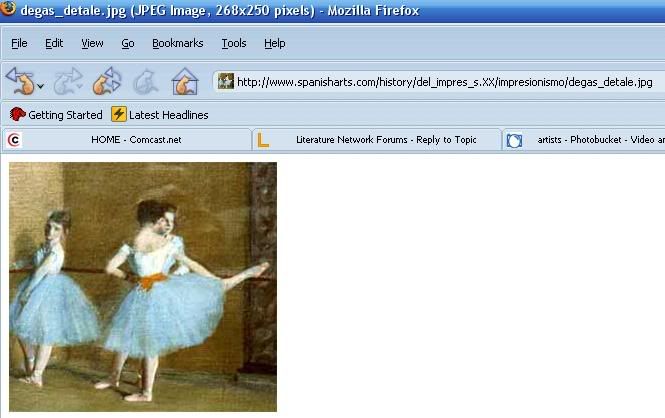
    Alright, assuming you have done an image search for something you want. I did a Google image search for "Degas" , picked the result I want, and I clicked on the "show full size image option".

    Okay, so here is my image that I like:


    Notice that the picture is by itself with the url of the pic in the address bar. Copy the url.

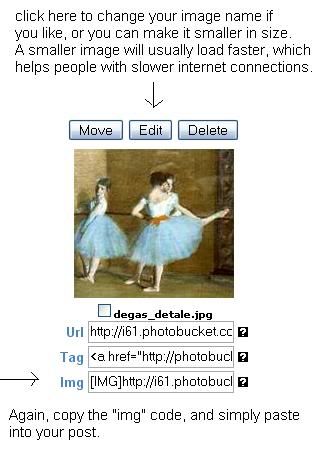
    Then in my photobucket album, I click on "add images by url" and paste the url in.


    simply add in your image then. It is convenient because you can also add in multiple images as well.


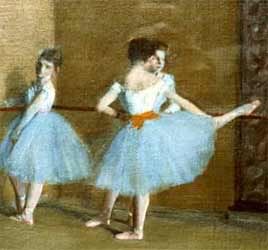
    Here is my image, the way it will be displayed. It is a fairly small picture, so I did not edit it for size.


    I will try to cover some of the other image hosts in a few days, for folks who don't have or want a photobucket account. I like this host though, they are very easy to use, and of course, free.
    "It is a mistake to think you can solve any major problems just with potatoes."
    Douglas Adams


    "Frivolity is a stern taskmaster."
    Zippy the Pinhead


    ~Posting images tutorial~


  10. #25
    Muses Delight Nightwalk's Avatar
    Join Date
    Jan 2006
    Posts
    141
    Hello Kathy, thanks for the thread, it's been most helpful.

  11. #26
    Kat in a Hat kathycf's Avatar
    Join Date
    Apr 2006
    Location
    Massachusetts, USA
    Posts
    4,816
    Blog Entries
    58
    Quote Originally Posted by Nightwalk View Post
    Hello Kathy, thanks for the thread, it's been most helpful.
    Hi there. Glad to hear it has helped you.
    "It is a mistake to think you can solve any major problems just with potatoes."
    Douglas Adams


    "Frivolity is a stern taskmaster."
    Zippy the Pinhead


    ~Posting images tutorial~


  12. #27
    Kat in a Hat kathycf's Avatar
    Join Date
    Apr 2006
    Location
    Massachusetts, USA
    Posts
    4,816
    Blog Entries
    58
    Just a quick note, I have noticed extra [img tags around some pictures being posted. If you are copying and pasting image code generated by your photohost (such as photobucket) the [img tag is already included. You do not need to use the img tag button when making your post (the mountain pic thingy) using code provided by your host.

    You only need that img tag button if you are enclosing the url of the image (the url is the part that starts with http:// )
    "It is a mistake to think you can solve any major problems just with potatoes."
    Douglas Adams


    "Frivolity is a stern taskmaster."
    Zippy the Pinhead


    ~Posting images tutorial~


  13. #28
    Lady of Smilies Nightshade's Avatar
    Join Date
    Apr 2005
    Location
    Now that would be telling it, wouldnt it?
    Posts
    13,715
    Blog Entries
    144
    hey Mods can we perhaps have this thread stickied???
    its a helpful thread
    My mission in life is to make YOU smile
    ~~~~~~~~~~~~~~~~~~~~~~~~~
    "The time has come," the Walrus said,"To talk of many things:

    Forum Rules- You know you want to read 'em

    |Litnet Challange status = 5/260
    |currently reading

  14. #29
    Kat in a Hat kathycf's Avatar
    Join Date
    Apr 2006
    Location
    Massachusetts, USA
    Posts
    4,816
    Blog Entries
    58
    Thanks Night, I am glad you think so.

    If you have a very large picture (say 640x480 pixels and/or over 150kb in size or larger) and you want to post the pic but that is too big. Smaller images on a page load faster, especially for people with slow internet connections and take up less room on the page. To fix this problem, you can make a thumbnail of your picture. A thumbnail is a smaller version of your original pic and when you put it in your post people can click on it to expand the image which will cause a new browser window to open with the originally sized picture. This can be accomplished in a few ways. One, if you are using an image host (well obviously you would be, how else can you post personal photos? :P Besides attaching them that is.)
    "It is a mistake to think you can solve any major problems just with potatoes."
    Douglas Adams


    "Frivolity is a stern taskmaster."
    Zippy the Pinhead


    ~Posting images tutorial~


  15. #30
    Kat in a Hat kathycf's Avatar
    Join Date
    Apr 2006
    Location
    Massachusetts, USA
    Posts
    4,816
    Blog Entries
    58
    Ok, anyway....Some image hosts will generate thumbnail code for you, such as photobucket. If that is your host, then you would select the image you want to use, scroll to the bottom of the page and click on generate html/img code. This will bring you to a page with different types of code. You will then select IMG clickable thumbnails for message boards. Make sure to use the message board one because the html code won't work.

    What if you have a different host for your picture and they don't generate code? It takes a little longer but is not hard. Really really. You will use bbcode like so: (I know my example picture is large take it as an object lesson on why thumbnails are important...)
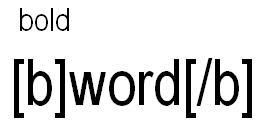


    First the code for the url (the address of the image on the web, and then img codes and enclosing all that is the other url code. You would type it out exactly like the example, but of course using your images url--with no space in bwtween the words. When using bbcode be sure to use the brackets" [" and" ]" and ending code also has a backslash in front of it. For example this is what I would do to make a word bold:


    This is the end result:


    This is a very large picture that my friend Kev put in his blog, but it is way too huge to post in it's original size. If somebody wishes to see his pic in all it's glory then they have the choice to click on the thumbnail. So there you have it, thumbnails 101. And yes, it is easier to have an image host that generates code for you. I use photobucket.

    I can do another post on cropping and resizing as well, maybe in a few days.
    Last edited by kathycf; 12-18-2006 at 05:16 AM.
    "It is a mistake to think you can solve any major problems just with potatoes."
    Douglas Adams


    "Frivolity is a stern taskmaster."
    Zippy the Pinhead


    ~Posting images tutorial~


Page 2 of 5 FirstFirst 12345 LastLast

Similar Threads

  1. Pictures In My Mind...
    By Reichenbach in forum Personal Poetry
    Replies: 4
    Last Post: 02-16-2009, 12:41 AM
  2. What i found out about images
    By Nightshade in forum General Chat
    Replies: 7
    Last Post: 12-04-2005, 10:35 PM
  3. Character Images
    By Lara in forum General Chat
    Replies: 142
    Last Post: 06-02-2005, 12:28 PM

Posting Permissions

  • You may not post new threads
  • You may not post replies
  • You may not post attachments
  • You may not edit your posts
  •